
If you run an independent insurance agency, you already know the drill. A contractor needs a certificate of insurance in the next 30 minutes or they lose a job site. Your CSR is on another call. Your producer is in the middle of a renewal quote. And the COI request just keeps sitting there.
COI processing is one of the highest-frequency, lowest-margin tasks in any insurance agency — and it’s one of the first things agents delegate when they hire a virtual assistant. This guide breaks down exactly how a COI processing virtual assistant works, what they handle, and how to set one up fast.

What is a COI processing virtual assistant?
A COI processing virtual assistant is a remote administrative professional trained specifically to handle certificate of insurance requests for insurance agencies. They work inside your existing agency management system — AMS360, EZLynx, HawkSoft, Applied Epic, or NowCerts — and manage the full COI lifecycle from request intake to delivery and tracking.
Unlike a general VA who needs months of training to understand insurance terminology, a trained insurance VA already knows the difference between an additional insured and a certificate holder, understands endorsement requirements, and can spot when a certificate holder’s requirements exceed the underlying policy limits.
What does COI processing actually involve?
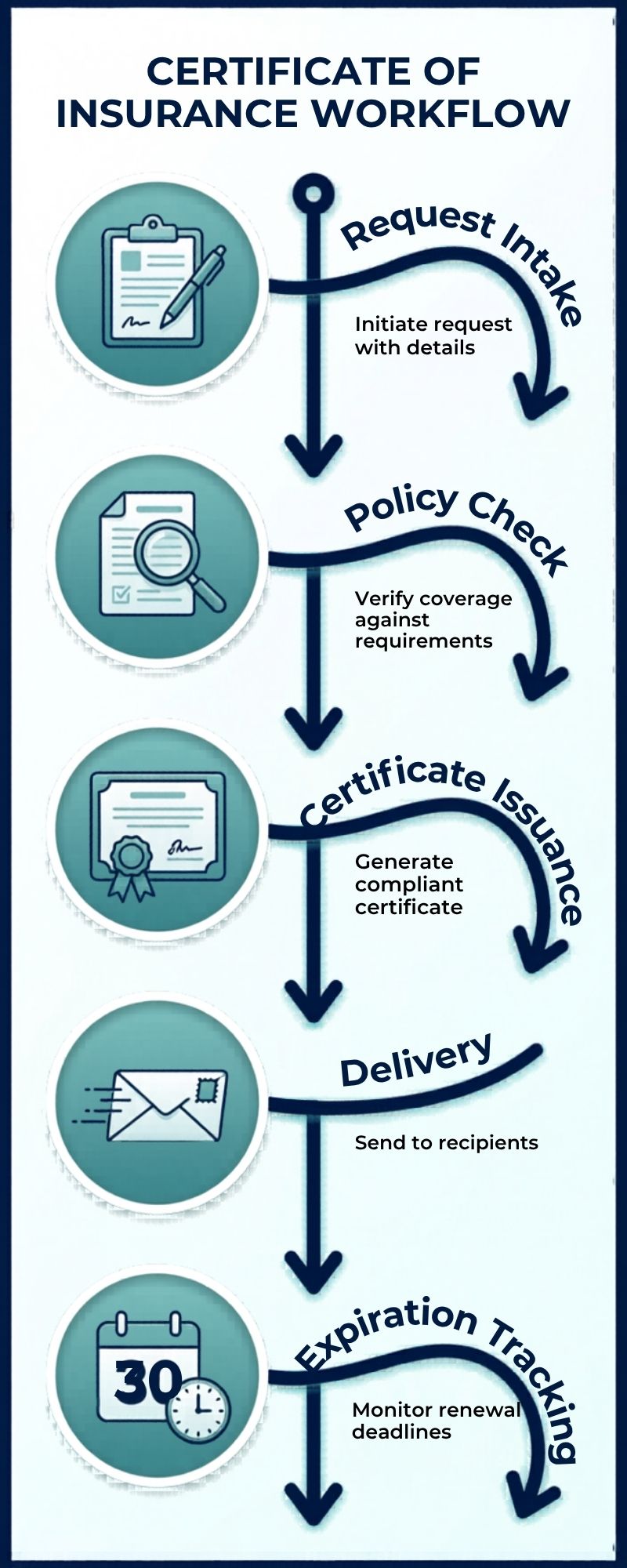
A full COI workflow has more steps than most agents realize when they’re doing it manually:
- Request intake: Monitoring a dedicated inbox (e.g., coi@youragency.com) or task queue for incoming certificate requests from clients, contractors, lenders, and landlords.
- Policy verification: Checking that the underlying policy is active, that coverage limits meet the certificate holder’s requirements, and that any required endorsements (additional insured, waiver of subrogation) are in place.
- Certificate issuance: Generating the ACORD 25 (liability) or ACORD 28 (property) certificate directly in the AMS and delivering it to the requesting party within the agreed turnaround window.
- Holder tracking: Logging every certificate issued with the holder name, expiration date, and any special conditions so renewals don’t fall through the cracks.
- Expiration follow-up: Proactively flagging certificates approaching expiration and initiating renewal before the client or holder has to ask.
- E&O documentation: Keeping a clean activity log of every request, issuance, and delivery for audit protection.
For a mid-sized commercial agency, a single account manager might handle 20–50 COI requests per week. A trained COI processing VA can bring average turnaround from 24–48 hours down to under 2 hours.
Why COI processing bogs down agencies
The problem with COI requests isn’t that they’re complicated. Most of them aren’t. The problem is that they’re urgent, high-volume, and they arrive unpredictably throughout the day — which means they constantly interrupt whatever your licensed staff is trying to accomplish.
Every time a producer stops to process a certificate, they lose their train of thought on a renewal, delay a follow-up call, or push a new business quote to tomorrow. That friction compounds across hundreds of requests per year into real revenue drag.
Commercial lines agencies feel this most acutely. A single general contractor client can generate 30, 40, even 80 COI requests per year as they bid and win new projects. Without a dedicated system and a dedicated person running it, certificates become a bottleneck that frustrates clients and slows growth.
AMS platforms a COI VA works in
A competent insurance VA should be able to issue certificates directly in the platforms your agency already uses. The most common ones our VAs at Silkee work in include:
- Vertafore AMS360 — the most widely used AMS for independent agencies, with a built-in certificate issuance workflow
- Applied Epic / Applied TAM — common in larger brokerages and MGAs
- EZLynx — popular with personal lines and small commercial agencies
- HawkSoft — a strong choice for independent agencies who want simplicity and speed
- NowCerts — cloud-based with fast COI generation, popular with newer agencies
- QQCatalyst — often used by agencies that grew out of captive or cluster arrangements
When you onboard a VA for COI work, you set up role-based access with the minimum permissions needed to issue certificates and log activities — typically read access to policy data plus write access to certificate records and activity notes.
How to set up a COI processing workflow with your VA
The agencies that get the most out of their COI VA are the ones who invest 2–3 hours upfront building a simple SOP. Here’s what that looks like in practice:
Step 1: Create a dedicated COI inbox
Set up a shared mailbox like coi@youragency.com and redirect all certificate requests there. Give your VA access to monitor this inbox every 30–60 minutes during business hours. This keeps COI requests out of individual producer inboxes where they get buried.
Step 2: Document your standard certificate holders
Most agencies have a set of recurring certificate holders — the same general contractors, lenders, landlords, and municipalities that show up over and over. Build a quick reference list with the correct holder language for each one. Your VA can reference this list to issue certificates in minutes rather than hunting down the right wording every time.
Step 3: Define your turnaround commitment
Decide what your standard turnaround promise is — 2 hours is a strong benchmark for most agencies — and build your VA’s schedule around it. If a request comes in at 4:45 PM, define whether same-day or next-morning delivery is acceptable.
Step 4: Set escalation rules
Some requests need licensed staff involvement — requests where the holder requirements exceed current policy limits, or where an endorsement needs to be added before the certificate can be issued. Define these escalation triggers clearly so your VA knows exactly when to flag rather than proceed.
Step 5: Build a tracking log
A simple spreadsheet or AMS activity log tracking every certificate issued — request date, holder name, policy number, expiration date, delivery confirmation — gives you E&O protection and makes renewal outreach proactive rather than reactive.
What Silkee’s insurance VAs handle on day one
At Silkee Solutions, our Insurance Concierge package is built specifically for agencies that need real insurance back-office support — not a generalist who needs six months of training before they’re useful.
Our VAs come onboarded with working knowledge of AMS platforms, ACORD form standards, and common certificate holder requirements. From day one, they can handle:
- COI request intake and issuance in your AMS
- Certificate holder tracking and expiration monitoring
- ACORD 25 and ACORD 28 certificate generation
- Additional insured and waiver of subrogation endorsement coordination
- Activity logging for E&O documentation
- Renewal follow-up for expiring certificates
- Escalation to your licensed staff when coverage gaps are identified
Most of our clients see their COI turnaround drop from 24+ hours to under 2 hours within the first two weeks. See our Insurance Concierge package or book a free consultation to talk through your agency’s specific setup.
COI processing VA vs. in-house CSR: what’s the cost difference?
Hiring a full-time CSR to handle COI processing alongside other admin tasks costs $38,000–$55,000 per year in salary alone — before benefits, payroll taxes, office space, and equipment. And in most agencies, a CSR doing COI work is also the person answering phones, handling endorsements, and managing the renewal pipeline, which means COI requests compete with everything else for attention.
A dedicated COI processing VA from Silkee costs a fraction of that, with no overhead, no PTO, and no downtime during peak certificate seasons. You get a professional who is focused on certificates and back-office insurance tasks — nothing else competing for their attention.
For agencies processing 50+ certificates per month, the ROI case is straightforward: the VA pays for itself in the licensed staff hours it frees up within the first month.
Frequently asked questions
Can a virtual assistant issue certificates of insurance without being licensed?
Yes. Issuing a certificate of insurance is an administrative task, not a coverage decision. The licensed agent has already bound the underlying policy; the VA is simply generating and delivering the certificate document that evidences that coverage. This is standard practice in agencies of all sizes.
What happens when a certificate holder’s requirements exceed the policy limits?
This is an escalation trigger, not something the VA resolves independently. When the certificate holder requirements exceed what the current policy provides, the VA flags the request for a licensed agent to review and determine whether an endorsement or coverage increase is needed before the certificate can be issued.
How do I give a remote VA access to my AMS?
Most major AMS platforms support role-based user access. You create a named user account for your VA with the minimum permissions needed — typically certificate issuance and activity logging, without access to billing, commissions, or other sensitive areas. All sessions are logged by the AMS for audit purposes.
What is a realistic turnaround time for COI requests with a VA?
Most trained insurance VAs can turn around a standard COI request in 30–60 minutes once they have a working SOP and AMS access. For agencies that set up a dedicated COI inbox and clear escalation rules, a 2-hour turnaround commitment is very achievable — even for requests that come in mid-afternoon.
Which AMS platforms does Silkee’s COI VA support?
Our insurance VAs work in AMS360, Applied Epic, EZLynx, HawkSoft, NowCerts, and QQCatalyst. If your agency uses a different platform, let us know during your consultation — we can assess fit and onboarding timeline based on your specific stack.